Relution Server 26.0
New versioning scheme
Starting in 2026, Relution will use a uniform versioning scheme for all apps, services, and Relution to ensure consistent and clear presentation of releases. In the future, the version number will consist of the year and a sequential release number, ensuring clear, traceable releases.
New platforms: watchOS & visionOS
To further increase device diversity and respond flexibly to market demands, Relution now also supports watchOS and visionOS and seamlessly integrates both platforms into the existing MDM.
All key features are available for both, including automatic enrollment, device inventory, restrictions, configurations (e.g., Wi-Fi, certificates, password policies), app management, and device actions.
Administrators can create, apply, and remove app compliance configurations on watchOS devices—just like on iOS, macOS, and tvOS.
Apple Watches are paired via a managed iPhone and displayed in the new “Paired Devices” tab. Changes to apps, such as different bundle identifiers, are also correctly taken into account.
AVV signing
Effective immediately, order processing agreements (AVV) in accordance with the General Data Protection Regulation (GDPR) can be concluded directly in Relution itself. To sign the agreement, the customer provides the necessary information, including the emergency contact and the name and email address of the signatory.
After entering the data, a contract preview can be generated and reviewed. Once the contract is approved, the digital signature is applied. Subsequently, both Relution, via the license server, and the customer receive a copy of the signed document, which can be downloaded at any time.
If changes are made to the contract, the signing process begins again. The customer also has the option of withdrawing a document via the settings. However, Relution keeps a traceable record of which contract version was valid within a certain period of time in order to ensure legal evidence.
This feature is enabled by default but can be disabled if necessary. In this way, Relution supports the efficient, transparent, and legally compliant conclusion of data processing agreements between Relution GmbH and the customer.
Device group migration
Starting with Relution Server 26.0, device group migration is automatically performed and activated when the server is started, unless it has already been done. This eliminates the need to assign policies directly to individual devices—policies will now be assigned via device groups.
This change ensures consistent management, simplified policy assignment, and clearly structured device organization. There are two types of device groups available: static and dynamic. Learn more about device groups here.
TeamViewer integration for remote support
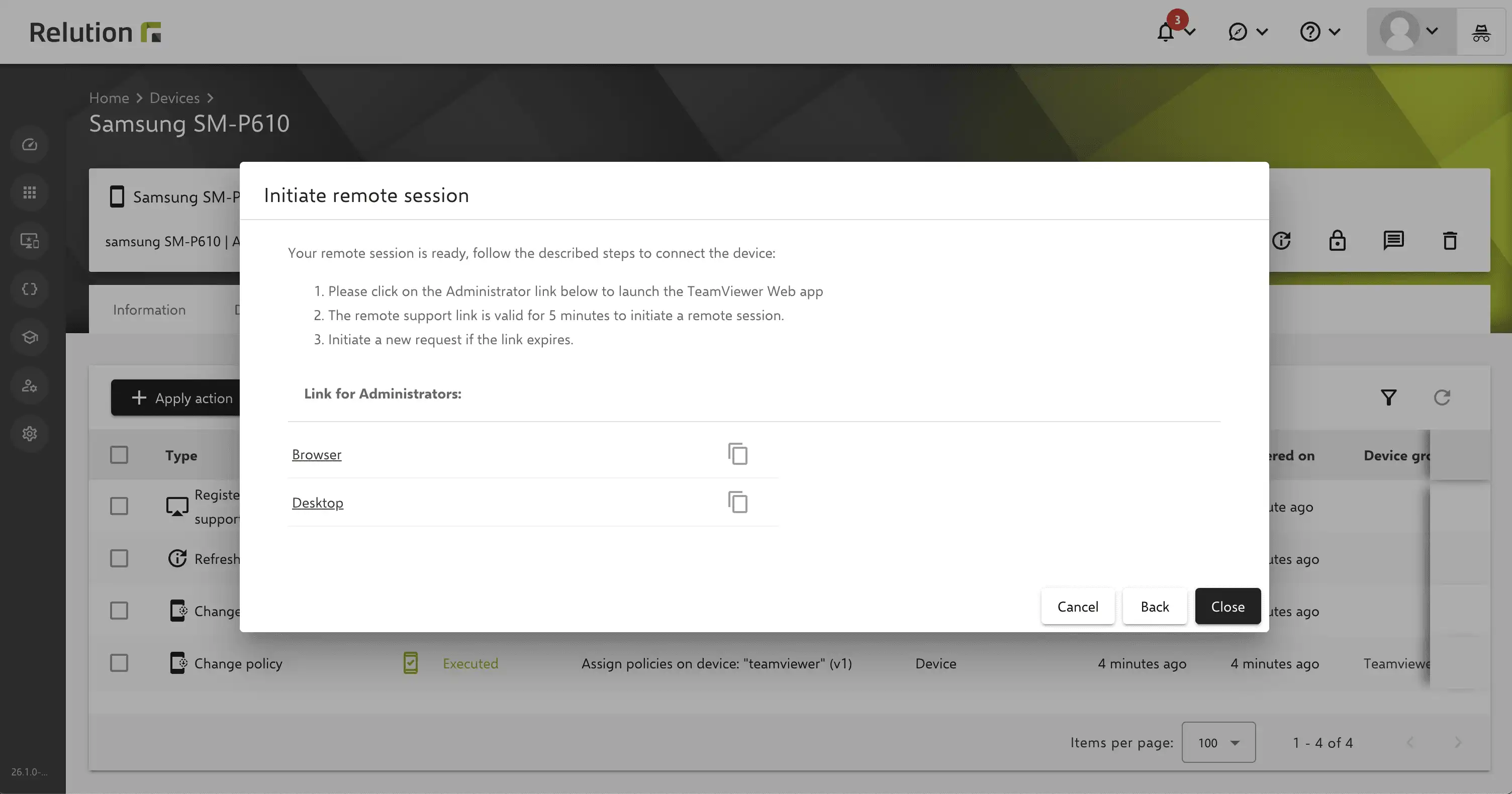
Starting with Relution version 26.0, an integrated TeamViewer connection is available, allowing secure remote support sessions to be started directly from Relution. This enables administrators to provide faster and more targeted support for managed end devices—for example, for error analysis, configurations, or technical problems. Direct screen sharing during remote maintenance makes diagnostics much more efficient, allowing support cases to be resolved more quickly.
Relution supports two licensing models:
- Bring Your Own License (BYOL) / Own License – existing TeamViewer licenses can be easily linked to Relution. This is possible for devices running Android Enterprise, Windows, macOS, and iOS (supervised mode only) operating systems.
- Relution License / Included License – If you do not yet have a license, you can purchase one as an add-on directly through Relution (“License Included”). Billing is conveniently handled through Relution. Supported operating systems are Android Enterprise, Windows, and macOS – iOS is currently in development.
Once your TeamViewer account has been configured in the remote maintenance settings and the TeamViewer Host app has been installed on the device, both supervised and unsupervised remote maintenance sessions can be started. Detailed instructions for device registration, setup, and distribution of the TeamViewer Host app can be found here: Own license and Included license.
Thanks to the cooperation with TeamViewer, remote support is now much easier, faster, and seamlessly integrated into the administration workflow.



Extended audit logs for device communication
With this version, the audit log has been extended to include all device endpoints. This means that communication between devices and the Relution server is now also fully recorded in the audit log. Administrators and security officers thus gain significantly more transparency about changes and activities originating directly from the device.
This enhancement offers significant added value for security-related scenarios: All changes initiated by the device are now fully traceable in the audit log, supporting comprehensive compliance and security requirements.
Improved version overview for policies
Starting with Relution version 26.0, a new, hideable and showable sidebar permanently displays the version, name, and status of each policy. This gives administrators transparency at all times and allows them to view details such as the publication date and description directly.
Versions can be named, searched for, quickly changed, and restored if necessary. Changes in the history can be traced at any time.


Advanced certificate options for Windows
With Relution 26.0, the certificate configuration for Windows has been significantly expanded. In addition to the previous fixed selection of a single certificate, all three certificate options are now available, similar to iOS and macOS:
- Individual selection of a certificate
- User certificates with type specification
- Certificate templates
This allows administrators to dynamically assign certificates in Windows and manage them more flexibly, instead of just selecting a static certificate. This ensures greater consistency across all platforms and facilitates central certificate management.
WinGet now always ready to use – automatic VC Redistributable installation
Previously, Microsoft VC Redistributable had to be installed manually before using WinGet. Starting with this version, Relution takes over the default configuration of WinGet and automatically installs the necessary dependency.
This means that the WinGet Store can be used directly without any manual effort. However, if a problem does occur, a helpful error message is displayed.
This change ensures reliable and immediate use of WinGet on all Windows devices.
Parent App Update: Time-based app restrictions via the Parent App
Starting with Relution version 26.0 and Relution Parent App 26.0, parents can specifically restrict the time their children spend using apps. This feature allows them to select and restrict multiple apps from the Installed Apps Overview. The following types of restrictions are available:
- Complete lock/unlock: The app remains locked until the Parent App removes the restriction or Relution applies another policy with higher priority (e.g., class mode).
- Temporary lock/unlock: The app is locked from the current time until a specified end time.
- Scheduled lock/unlock: The app is locked on selected weekdays at defined start and end times.
- In addition, predefined schedule profiles can be used to store complete or scheduled locks/unlocks.
The Parent App clearly displays the restrictions and allows them to be updated or restored. Changes can be tracked in the version history.
The time-based restrictions have lowest priority, so other policies such as lessons or system-side policies take precedence. This feature is backward compatible with older server versions.
With this extension, parents can control app usage flexibly, appropriately, and transparently, while administration by administrators remains efficient.
Relution Files app now available for Android Enterprise
With Relution version 26.0, the Relution Files app is available for Android Enterprise for the first time. As with iOS, SMB and WebDAV shares are supported and can be managed centrally via the file share configuration in the Relution Admin Portal.
The Relution Files app enables secure access to local file shares and is particularly suitable for companies and educational institutions that want to manage data centrally. Users can access relevant documents and use the integrated camera to save images directly to the network drive. This improves data protection, as no separate camera app is required.
There are differences between Android Enterprise and iOS when it comes to single sign-on (SSO): The SSO credentials are stored directly in the Relution Files app. Automatic transfer via the Relution Agent is not possible because Relution Shared Device Login is not supported on Android Enterprise.
Java version 21 required
Java 21 is required for Relution 5.35 and higher. Relution 26.0 is no longer compatible with older Java versions. With the recommended Docker installation, the update is performed automatically; no action is required.
If you are running Relution natively, you may need to update Java. Please also note that native installation will no longer be supported in the medium term (as announced at Summit 2025) and we recommend switching to a Docker-based installation.
The changelog for the release can be found here.
For reasons of better readability, the masculine form is used on this page when referring to persons and personal nouns. In accordance with the principle of equal treatment, the corresponding terms apply to all genders. The abbreviated form is used for editorial reasons only and does not imply any value judgment.